A friend of mine from China was traveling abroad for work and asked me to recommend a good app for watching movies. Naturally, I suggested Stremio—I've been using it for years. But after installing it, he ran into the error "Player Error: Stremio encountered an error with this media" when trying to play a movie. So I helped him out remotely. After a whole day of troubleshooting, we finally fixed it. Here's what worked.
1. The Most Effective Fix (Tested Personally)
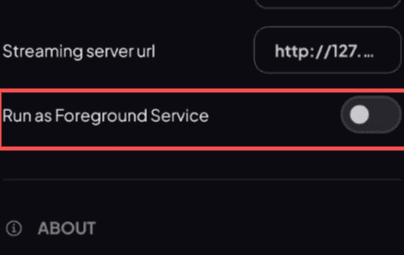
Turn off the "Run in Foreground" option in Stremio settings.
Open Stremio, click the settings icon, scroll down to the "Services" section, and look for "Run as foreground service." If it's enabled, disable it. This should fix the problem about 80% of the time.
After helping my friend, I did some research online and found that quite a few people have experienced the same issue. Other users have shared various solutions, so I've compiled them all here.
2. Try Using a VPN
Some users reported that turning on a VPN while playing movies in Stremio solved the problem—and turning it off brought the error back. My guess is this has to do with connection quality. If the first method doesn't work for you, give this a shot.
3. Use an External Player
Instead of using Stremio's built-in player, try an external one. I recommend VLC—I've never had this issue when using it. For detailed installation instructions and a guide on how to set up an external player on Android, check out this article:
4. Enable Notification Permissions for Stremio
Step 1: Enable in System Settings
- Open your device's Settings.
- Go to Apps or App Management.
- Find Stremio in the app list.
- Tap Notifications.
- Make sure the Allow notifications toggle at the top is turned on.
5. Update Stremio to the Latest Version
Stremio has gone through many versions, and newer releases tend to have fewer bugs. I recommend updating to the latest version—it might just fix this issue.
6. Clear Stremio's Cache
If you've never cleared Stremio's cache, it could be tens or even hundreds of gigabytes by now. Every time you play a movie, it uses cache storage. When your cache is full or running low, you might see the "Player Error: Stremio encountered an error with this media" message because there's not enough space left to stream the movie.
Here's how to clear it:
- Open your phone's Settings.
- Tap Apps or App Management.
- Find and tap Stremio.
- Tap Storage & cache.
- Clear the cache.
Hope this helps you fix the problem. Good luck!