Tool Overview
Core Function Allows you to install multiple Stremio applications on the same Android phone or TV box, with each account running independently without interference. Family members can each have their own dedicated viewing space without sharing a single account.
Technical Principle By modifying the APK's package name and icon theme color, the Android system recognizes them as different applications, enabling multi-instance functionality.
Environment Setup (One-Time Configuration)
Required Software Checklist
① Python 3.13 or Higher
- Download: https://www.python.org/downloads/
- Installation Key Point: Must check "Add python.exe to PATH" option
- Verification Method: python --version
[Image Placeholder 02: Python installation window showing the PATH checkbox option]
② Java Development Kit (JDK)
- Download: https://www.oracle.com/java/technologies/downloads/
- Verify After Installation: java -version
③ Official Stremio APK File
- Official Download: https://www.stremio.com/downloads
- Or APKMirror: https://www.apkmirror.com/apk/stremio/
- Recommended: Download the latest stable version
④ This Renaming Tool
- Project URL: https://github.com/streetlegithub/stremio-renamer
- Click green Code button → Download ZIP
- Extract to an English-path directory
Detailed Operation Process
Step 1: Install Tool Dependencies
- Navigate to the tool folder
- Type cmd in the address bar and press Enter (quick command line access)
- Execute installation command: pip install -r requirements.txt
- Wait for dependency packages to complete installation
[Image Placeholder 03: Command line window showing dependency installation progress]
Step 2: Launch Tool (Graphical Interface Recommended)
Graphical Interface Mode (Beginner-Friendly)
In the command line window at the tool directory, type: python stremio_renamer_gui.py
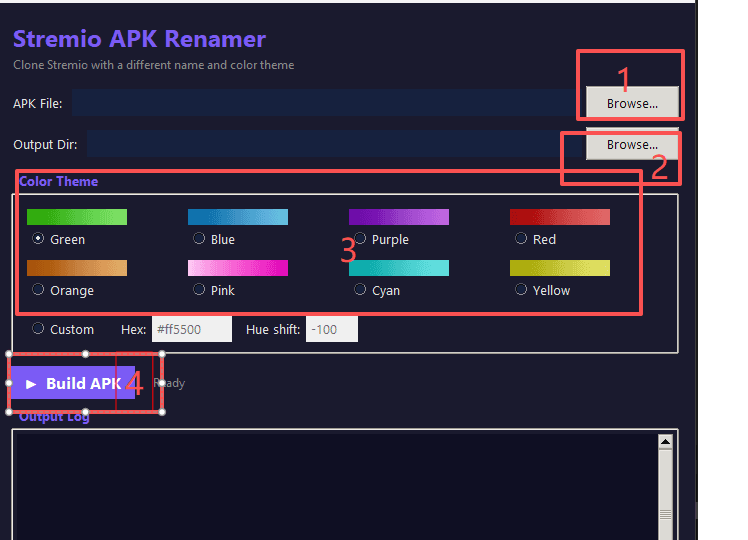
The interface will open automatically, containing the following functional areas:
- APK file selector
- Color theme options
- Custom configuration panel
- Build button
[Image Placeholder 04: GUI interface showing the main window with file selection and color options]
Command Line Mode (Advanced Users)
python stremio_renamer.py [APK_file_path] [color_code]
Example: python stremio_renamer.py Stremio_v1.6.9.apk blue
Available Preset Colors: red, blue, green, purple, orange, pink
Step 3: Configure and Generate APK
In the Graphical Interface:
- Select APK File - Click browse button, locate your downloaded Stremio APK
- Choose Theme Color - Select from list or enter hexadecimal color code (e.g., #FF5733)
- Click Build - Click "Build APK" button to start processing
- Wait for Completion - Progress bar shows current status (typically 2-5 minutes)
[Image Placeholder 05: APK building process with progress bar]
Processing Workflow Explanation:
- Automatically downloads APKTool (first run only)
- Decompiles original APK
- Modifies package name and resource files
- Replaces icon colors
- Repackages and signs
- Outputs to output folder
Installing to Device
Method 1: Direct USB Installation
- Copy the generated APK to a USB drive
- Insert USB drive into Android device
- Open the system's built-in file manager
- Find the APK file and tap to install
[Image Placeholder 06: USB drive connected to Android TV showing file manager]
Method 2: Wireless Transfer
Recommended Tools:
- Send Anywhere
- SHAREit
- LocalSend
Operation Steps:
- Connect computer and Android device to the same WiFi
- Use transfer tool to send APK
- Receive and install on device
Permission Settings (Important)
Initial installation may prompt "Cannot install," you need to:
- Go to Settings → Security & Privacy
- Find Install Unknown Apps or Unknown Sources
- Allow file manager or transfer tool to install applications
[Image Placeholder 07: Android settings screen showing Unknown Sources permission toggle]
Practical Configuration Schemes
Family Multi-Member Solution
User | Color | Content Focus | Plugin Configuration Dad | Blue | News/Documentaries | News source plugins Mom | Pink | TV Series/Variety | Series tracking plugins Kids | Green | Animation/Children | Children's content filter Shared | Gray | Movie Viewing | General media plugins
Content Category Solution
Category | Color | Purpose Movies Zone | Red | Movie-related plugins only Series Zone | Purple | Episode progress management Anime Zone | Orange | Anime resource aggregation Sports Live | Yellow | Sports event plugins
[Image Placeholder 08: Android home screen showing different colored Stremio icons arranged in a grid]
Core Features
✅ Completely Independent Operation
- Each version has independent data directory
- Account logins don't affect each other
- Plugin configurations managed separately
- Watch history recorded individually
✅ Resource Usage
- Each app takes approximately 150MB storage
- Memory usage same as original version
- No additional battery drain
✅ Update Strategy
- Modified versions cannot auto-update through app store
- Need to manually download new APK and recreate
- Recommend saving configuration scripts for common colors
✅ Compatibility
- Supports Android 5.0 and above
- Works on phones, tablets, TV boxes, projectors
- No Root permission required
Frequently Asked Questions
Q: How many versions can be installed on the same device? A: Theoretically unlimited, practically recommend 3-6 to avoid interface clutter.
Q: Will different colored versions interfere with each other? A: Absolutely not. Each version has a different package name, system treats them as independent apps.
Q: Can I still use the original Stremio? A: Yes, modified versions don't affect the original installation and usage.
Q: Do plugins need to be installed repeatedly? A: Yes, each version has an independent plugin library that needs separate configuration.
Q: Getting "App not installed" or "Parse error"? A: Check the following:
- Is unknown sources permission enabled
- Is the APK file completely downloaded
- Try regenerating the APK
Q: Can I modify the app display name? A: Current version doesn't support GUI name modification, but can be achieved through command-line parameters.
Q: Can data be migrated between different versions? A: Direct migration not supported due to different package names. Recommend planning usage scenarios before installation.
Advanced Tips
Batch Generation Script
Create batch_build.bat file (Windows):
@echo off set APK=Stremio_v1.6.9.apk
python stremio_renamer.py %APK% red python stremio_renamer.py %APK% blue python stremio_renamer.py %APK% green python stremio_renamer.py %APK% purple
echo All APKs generated! pause
Custom Hue Adjustment
Use --hue-shift parameter to adjust hue: python stremio_renamer.py Stremio.apk blue --hue-shift 45
Value range: -180 to +180
Specify Output Directory
python stremio_renamer.py Stremio.apk red -o D:\MyAPKs
[Image Placeholder 09: Command line showing advanced options being used]
Important Notes
⚠️ Personal Use Only This tool is for personal and family use only. Do not use for commercial distribution or repackaging for app stores.
⚠️ Signature Explanation Generated APKs use debug signature (debug keystore), suitable for sideloading, not for app store publishing.
⚠️ Legal Compliance Ensure you have the right to modify and use the APK file. Respect the original author's copyright.
⚠️ Security Reminder Only use Stremio APKs downloaded from official channels. Avoid using modified versions from unknown sources.
Troubleshooting
Python-Related Issues
"Not recognized as internal or external command" error
- Check if Python is correctly installed
- Confirm it's added to system PATH
- Restart command line window
Dependency Installation Failure Use mirror source: pip install -r requirements.txt -i https://pypi.tuna.tsinghua.edu.cn/simple
APK Generation Issues
APKTool Download Failure
- Check network connection
- Try manually downloading APKTool to tool directory
Signature Failure
- Confirm Java JDK is correctly installed
- Check if disk space is sufficient
Update Log Reference
Based on actual project situation, recommend monitoring:
- New Stremio APK version releases
- Tool new features (such as custom app names)
- Compatibility fixes
Get Latest Version: Visit https://github.com/streetlegithub/stremio-renamer/releases
Start building your exclusive Stremio matrix!
For issues, ask in GitHub Issues or refer to project Wiki documentation.