🎯 Issue Description
When using Stremio on a Google TV Streamer (4K):
- Selecting a movie or show only prompts you to sign in to streaming services
- No available streams are shown
- Playback cannot start
At the same time:
- Streams work perfectly on phone
- Streams work perfectly on desktop
- RD+ / Torrentio streams load and play normally on other devices
On the TV device, you may only see platform options such as:
- Netflix
- Amazon Prime Video
- Other official streaming services
Instead of the available addon streams.
✅ Most Effective Fix: Disable the WatchHub Addon
In most cases, this issue is caused by the WatchHub addon.
WatchHub prioritizes official streaming service sources and can override or hide available addon streams.
How to Disable WatchHub
- Open Stremio
- Go to Addons
- Find WatchHub
- Open it
- Click Disable (or Uninstall)
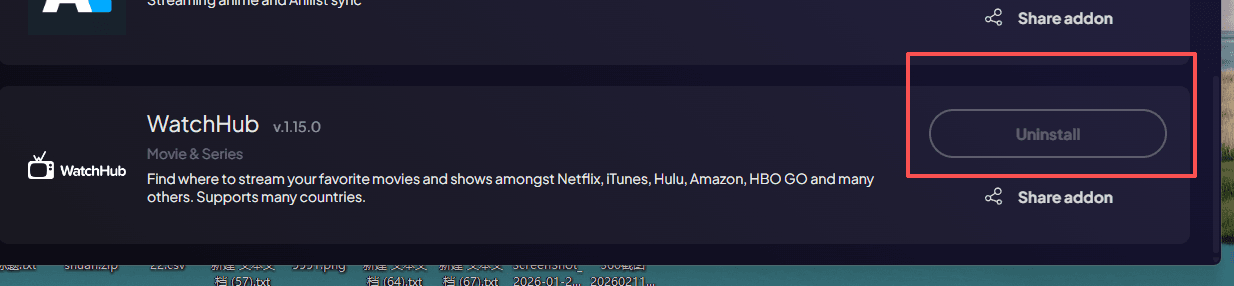
[Insert screenshot here: Addons → WatchHub → Disable button]
After Disabling
- Close Stremio
- Reopen the app
- Search for a title again
- Check if streams now appear
In most cases, this immediately restores available streams.
🔄 If It Still Doesn’t Work
Try the following in order:
1. Restart the Device
Restart your Google TV / TV streamer and test again.
2. Clear Stremio Cache
On Google TV:
Settings → Apps → Stremio → Storage → Clear Cache
(Do not clear data unless necessary.)
3. Reinstall Stremio on the TV
- Uninstall Stremio
- Reinstall it
- Log back into your account
- Wait for addons to sync
- Test again
📌 Quick Summary
If Stremio on Google TV only shows streaming service login prompts and no available streams —
Disable the WatchHub addon first.
This is the most common and most effective fix.