1. What is the Meteor Addon?
 Meteor is a high-performance streaming addon with Debrid service support. It is an On Demand type Stremio addon that provides HD VOD content including Movies (Films), TV Shows, and Anime.
It can be configured with virtually any Debrid service you prefer, and also supports Torrent sources for users without a Debrid account. Meteor's greatest advantage lies in its simplicity — the setup is very similar to Torrentio, offering rich settings for sorting, quality/filters, and more.
2. Key URLs at a Glance
| Item | URL |
|---|---|
| 🔗 Addon Info Page | https://stremio-addons.net/addons/meteor-midnightignite |
| ⚙️ Configuration Page | https://meteorfortheweebs.midnightignite.me/configure |
| 📄 Manifest JSON URL | https://meteorfortheweebs.midnightignite.me/manifest.json (A full manifest link containing your personal settings will be generated after configuration) |
| 🌐 Official Homepage | https://meteorfortheweebs.midnightignite.me/ |
| 👤 Developer Page | https://stremio-addons.net/users/midnightignite |
Addon version: 1.0.0 | Developer: midnightignite | Language support: Multilingual
3. Pre-Installation Preparation
3.1 Install the Stremio App
Before installing Meteor, you must ensure that the Stremio app is already installed and set up on your streaming device.
Supported Devices:
- Windows / Mac / Linux PC
- Android Phone / Tablet
- Fire TV Stick / Fire TV
- Google TV / Android TV Box
- iOS Devices
3.2 Choose Your Streaming Source (Pick One)
| Method | Description | VPN Required? |
|---|---|---|
| 🅰️ Debrid Service (Recommended) | Use paid resolving services like Real-Debrid or TorBox for high-speed HD links | ❌ No |
| 🅱️ Torrent Sources (Free) | Stream directly via P2P torrent downloads | ✅ VPN is a must! |
⚠️ Warning: If you choose Torrent sources, make sure to enable and keep a VPN connected on all your devices to protect your IP address. Otherwise, you may receive warning letters from your ISP.
3.3 Obtain a Debrid API Key (If Using a Debrid Service)
Meteor currently integrates with TorBox and Real-Debrid. If you choose to use a Debrid service, you need to prepare your API Key in advance:
- Real-Debrid: Visit
https://real-debrid.com/apitokento get your key - TorBox: Log in to the TorBox website and find the API Key in your account settings
4. Configuring the Meteor Addon (Step-by-Step)
Like other Stremio addons, we recommend configuring Meteor on a PC first, then syncing it to your Google TV/Android Box or Firestick/Fire TV. You can also configure and install directly from a browser on your phone or tablet.
Step 1: Open the Configuration Page
Visit the official Meteor configuration page: https://meteorfortheweebs.midnightignite.me/configure
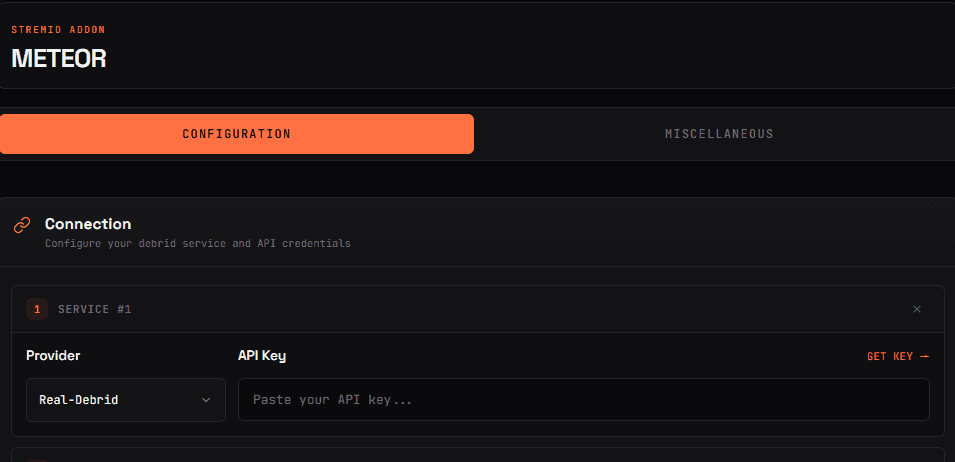
Open this URL in your browser and you will see the Meteor configuration interface.
Step 2: Select a Provider and Enter Your API Key
Choose your Provider (Debrid service or Torrent) and add your API Key.
How to do it:
- In the Provider dropdown menu, select your service:
Real-Debrid— The most popular Debrid serviceTorBox— Another popular optionTorrent— Free option (VPN required)
- Paste your API key in the API Key input field
💡 Beginner's Tip: If you have a Real-Debrid account, it's the best choice — fast speeds and high-quality links.
Step 3: Set Language Preferences
Select your Preferred Languages, Required Languages, and the Tags to display in results.
Recommended Configuration (English Users):
- Preferred Languages: Select
English - Required Languages: Leave empty (no restriction)
- Tags: Check as needed
Step 4: Set Resolution and Quantity Limits
Filter the resolutions you want to display, adjust the Max Results and Size limits, and set the Max Per Resolution.
Recommended Configuration:
| Setting | Recommended Value | Description |
|---|---|---|
| Resolutions | ✅ 2160p (4K), ✅ 1080p, ✅ 720p | Check the quality levels you want |
| Max Results | 20–30 | Maximum number of links returned per search |
| Max Size | 10 GB | Limit file size to avoid excessively large files |
| Max Per Resolution | 5–10 | Maximum results displayed per resolution |
Step 5: Set Filters and Minimum Seeders
Choose the filters you want to apply, and set the Minimum Seeders as needed.
Recommended Configuration:
- Filters: Check as needed (e.g., exclude CAM quality and other low-quality sources)
- Minimum Seeders: Set to
3–5(ensures enough seeders for smoother playback)
Step 6: Set Sort Order
Drag and drop the Sort Order to prioritize streaming results based on your personal preferences.
Suggested Sorting Priority:
- 🏆 Quality — Place first for HD priority
- 📦 Size — Moderately sized files load faster
- 🌱 Seeders — More seeders means faster speeds
- 📅 Others
💡 You can drag and drop items directly with your mouse to change the order.
Step 7: Install to Stremio
Once configuration is complete, an Install button will appear at the bottom of the page:
- Click the Install button
- Your browser will automatically invoke the Stremio app
- Stremio will pop up a confirmation window — click Install to confirm
Installation is now complete. Enjoy!
5. Post-Installation Verification
After installation, launch the Stremio app on your streaming device and check that Meteor appears in the addons list.
Verification Steps:
- Open the Stremio app
- Click the ⚙️ Gear Icon (Settings) in the top-right corner
- Go to the Addons tab
- Confirm that Meteor appears in the installed list
- Search for any movie/TV show and check if streaming links from Meteor are available
6. Reconfigure / Adjust Settings
If you find that Meteor's settings don't suit your streaming needs, you can easily reconfigure and reinstall from its official website.
Simply revisit: https://meteorfortheweebs.midnightignite.me/configure
Modify your settings and click Install again to overwrite the old configuration.
7. Extra Feature: Upload Torrents
On the Meteor official website, there are additional "miscellaneous" features, including the ability to upload torrents via direct file or magnet link. After selecting the content type, source, and uploader, you can let Meteor "analyze" it.
8. Frequently Asked Questions (FAQ)
❓ Q1: Can I use Meteor without a Debrid service?
Yes! Meteor can be configured with any Debrid service, and also supports Torrent sources for users without Debrid. However, using Torrent sources requires a VPN.
❓ Q2: What's the difference between Meteor and Torrentio?
Meteor's setup is very similar to Torrentio, offering sorting, quality/filter settings, and more. Meteor focuses more on simplicity and ease of use.
❓ Q3: Does Meteor support Anime?
Yes! In addition to providing HD streaming links for movies and TV shows, Meteor also offers Anime content.
❓ Q4: What is the Manifest JSON URL?
The core of a Stremio addon is its manifest.json. Meteor's base manifest URL is: